
- News
- Education News
- Results News
- Other Exam Results News
- NABTEB in-school May/ June results 2022 announced, check here
Trending
This story is from October 6, 2022
NABTEB in-school May/ June results 2022 announced, check here
The Registrar and Chief Executive of NABTEB in Benin, Edo State, Prof. Ifeoma Isiugo-Abanihe revealed that 58,659 of the 84,147 candidates scored five credits and above, including Mathematics and English Language, representing 69.60 per cent. Around 75,221 candidates obtained five credits and above, with or without English Language and Mathematics, representing 89.39 per cent.
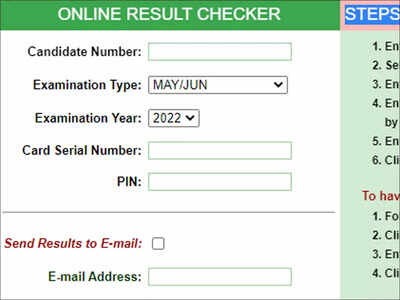
NEW DELHI: The National Business and Technical Examinations Board, (NABTEB) has released the In-School May/June National Business Certificate and National Technical Certificate (NBC and NTC) examinations 2022 results on its official website.
The Registrar and Chief Executive of NABTEB in Benin, Edo State, Prof. Ifeoma Isiugo-Abanihe revealed that 58,659 of the 84,147 candidates scored five credits and above, including Mathematics and English Language, representing 69.60 per cent.
Direct link to Check NABTEB May/June 2022 result
Candidates, who took the examination, can check and download their results online through the official website -
Step 1: Enter your Candidate Identification Number e.g. 38001178
Step 2: Select the Type of Examination
Step 3: Enter the 4 digits of your Examination Year e.g. 2002
Step 4: Enter the Card Serial Number found on the reverse side of your Scratch card. The Card Serial Number has an alphabet prefix followed by digits e.g. N123456789
Step 5: Enter the 12-digit Personal Identification Number (PIN) on your Scratch card eg. 012345678912
Step 6: Click Submit and wait for the results window to come up
To have your result sent to your e-mail address, do the followings:
Step 1: Follow steps 1-5 above.
Step 2: Click on the 'Send Results to E-mail' box
Step 3: Enter a valid e-mail address e.g. segun@yahoo.com
Step 4: Click Submit and wait for the results window to come up
You can now check your results through SMS
Send SMS in the format below:
NABTEB*ExamNo*PIN*ExamType*ExamYear To short-code 32327
For example:
Step 1: To check for May/June results,
Step 2: NABTEB*01001001*123456789012*MJ*2012
Step 3: To check for Nov/Dec results,
Step 4: NABTEB*01001001*123456789012*ND*2012
Note: Ensure you adhere strictly to the format above. There should be no space in the message. Wait for your result to be delivered to your mobile phone via SMS.
The Registrar and Chief Executive of NABTEB in Benin, Edo State, Prof. Ifeoma Isiugo-Abanihe revealed that 58,659 of the 84,147 candidates scored five credits and above, including Mathematics and English Language, representing 69.60 per cent.
Around 75,221 candidates obtained five credits and above, with or without English Language and Mathematics, representing 89.39 per cent.
Direct link to Check NABTEB May/June 2022 result
Candidates, who took the examination, can check and download their results online through the official website -
How to check NABTEB Result 2022
Step 1: Enter your Candidate Identification Number e.g. 38001178
Step 2: Select the Type of Examination
Step 3: Enter the 4 digits of your Examination Year e.g. 2002
Step 4: Enter the Card Serial Number found on the reverse side of your Scratch card. The Card Serial Number has an alphabet prefix followed by digits e.g. N123456789
Step 5: Enter the 12-digit Personal Identification Number (PIN) on your Scratch card eg. 012345678912
Step 6: Click Submit and wait for the results window to come up
To have your result sent to your e-mail address, do the followings:
Step 1: Follow steps 1-5 above.
Step 2: Click on the 'Send Results to E-mail' box
Step 3: Enter a valid e-mail address e.g. segun@yahoo.com
Step 4: Click Submit and wait for the results window to come up
You can now check your results through SMS
Send SMS in the format below:
NABTEB*ExamNo*PIN*ExamType*ExamYear To short-code 32327
For example:
Step 1: To check for May/June results,
Step 2: NABTEB*01001001*123456789012*MJ*2012
Step 3: To check for Nov/Dec results,
Step 4: NABTEB*01001001*123456789012*ND*2012
Note: Ensure you adhere strictly to the format above. There should be no space in the message. Wait for your result to be delivered to your mobile phone via SMS.
End of Article
FOLLOW US ON SOCIAL MEDIA
Visual Stories










Hot Picks
TOP TRENDING
Trending Stories
In Education
Entire Website
- NIOS ODE Class 10, 12 result 2024 declared for on-demand exams at results.nios.ac.in: Direct link and other details here
- CG TET Result 2024 out at vyapamonline.cgstate.gov.in, direct link to download scorecards here
- AP PECET 2024 seat allotment result declared, direct link to here: Check next steps
- Tamil Nadu is already implementing the acceptable components of the NEP but remains opposed to the three-language policy: Minister
- TS DSC 2024 Results Expected Soon at tgdsc.aptonline.in
- UP Police Result 2024: All you need to know about UPPRPB constable selection process
- BSEB Bihar Class 10 board exam 2025 registration begins: Check details here
- KLEE result 2024: Rank list for 3-year LLB course out, direct link here
- Assam ASTU result 2024 for B.Tech 6th semester out on astu.ac.in: Direct link to check result here
- UPPBPB UP police constable answer key 2024 out for Aug 23 exam: Direct link to download here
- 'Message for Modiji': Opposition takes jab at BJP over Nitin Gadkari's 'PM post' claim
- Kejriwal says he will resign in 48 hrs: Does this mean early polls in Delhi?
- Why it is so easy to quench ‘sadiyon ki pyas’ in dry Bihar
- 'He never listened ...': Anna Hazare reacts to Kejriwal's 'will quit' decision
- Taylor Swift's endorsement fails to move needle for Kamala Harris: Survey
- Kohli at his destructive best, shatters Chepauk wall with six
- Will Germany’s suspension of Schengen entry end the Europe dream?
- Melinda Gates reveals the 'best part' of not working with ex-husband Bill Gates
- 'Even Britishers didn't expect ruler more cruel in India': Kejriwal attacks BJP govt
- 'PR stunt ... gimmick': How BJP, Cong reacted to Kejriwal's shock announcement

Popular Categories
Hot on the Web
Top Trends
Trending Topics
World Largest HorseEID WishesOnam WishesPriyanka Chopra TattooKottukkaali OTT ReleaseEngineers Day WishesGoat CollectionHair LossSudha MurtyMalayalam ProducersIndia's Best Dancer 4Simi GarewalDilli BabuIndian National ParksLaung BenefitsVikas SethiApple iPhone 16Donald TrumpAadhar Card UpdateWordle Answer
Living and entertainment
Latest News
PM Modi's Sunday roadshow in Jamshedpur cancelled due to heavy rain4 types of tea to improve gut health and ease digestive issuesFour Zodiac Signs That Are Hard to Control'Message for Modi': Opposition takes jab at BJP over Nitin Gadkari's 'PM post' claimNetflix denies filmmaker Soham Shah’s plagiarism allegations over Squid Games, says claim holds 'no merit''Virat bhaiya's passion and dedication for the game is...': Sarfaraz KhanFather rapes and murders 8-year-old daughter in Madhya Pradesh, throws body in wellWeekly Career Horoscope, September 15 to September 21, 2024: Read your weekly astrological work predictions for all zodiac signsZodiac Signs That Crave a Luxurious Lifestyle"Miami Dolphins Owner Stephen Ross Eyes Multi-Billion Dollar Deal: The $7 Billion Power Play"Rajkummar Rao hails Kareena Kapoor Khan's The Buckingham Murders as a 'gripping thriller'MoS Finance likely to be convenor of GoM on GST compensation cessRole Rewind: Did you know Ranveer Singh and Deepika Padukone's love story has a strong Kareena Kapoor Khan connection?Coin Master free spins and coins for 15 September, 2024: Earn 7 million coins using today’s linksHow to set up partner sharing in Google PhotosIndia, Pakistan players involved in heated exchange during Asian Champions Trophy. WatchNoida authority fraud: 2 arrested in Rs 3.9 crore scam linked to fake bank accountsGovinda’s wife Sunita Ahuja talks about losing their premature daughter at three months: ‘That’s why I brought up Yash in a cocoon’
Copyright © 2024 Bennett, Coleman & Co. Ltd. All rights reserved. For reprint rights: Times Syndication Service